FinHub User Guide
FinHub is a desktop app for insurance agents to manage clients. It helps them to better organise all information related to each client, optimised for use via a Command Line Interface (CLI) while still having the benefits of a Graphical User Interface (GUI). If you can type fast, FinHub can get your client management tasks done faster than traditional GUI apps.
Tip: In addition to managing standard contact fields, FinHub also allows you to add reminders and meeting notes to each client. You also have the option to star or archive clients for better client organisation.
Tips:
Want to skip straight to the available commands?
Click Here for the Command Summary!
or need some definitions?
Click Here for the Glossary!
Note: FinHub opens active list by default at start/restart.
Target User and Assumptions Made
Our target users are insurance agents who:
- manage many existing and potential clients.
- may need to find contacts of particular clients.
- have to keep track of many meetings with clients.
- need to keep track of a huge amount of client information.
- have client of different priorities.
- can type fast and prefer typing commands to interacting with UI.
- are equipped with basic CLI knowledge.
- have Singaporean clients with English names.
Table of Contents
- 1. Quick Start
- 2. Features
- 3. Data and Storage
- 4. FAQ
- 5. Known Issues
- 6. Command Summary
- 7. Glossary
1. Quick Start
Make sure you have Java
17or above installed in your computer.
Mac users: Make sure you have the precise JDK version listed here.Download the latest
.jarfile from here.Copy the file to the folder you want to use as the home folder for FinHub.
Open a command terminal,
cdinto the folder you put the jar file in, and use thejava -jar FinHub.jarcommand to run the application.
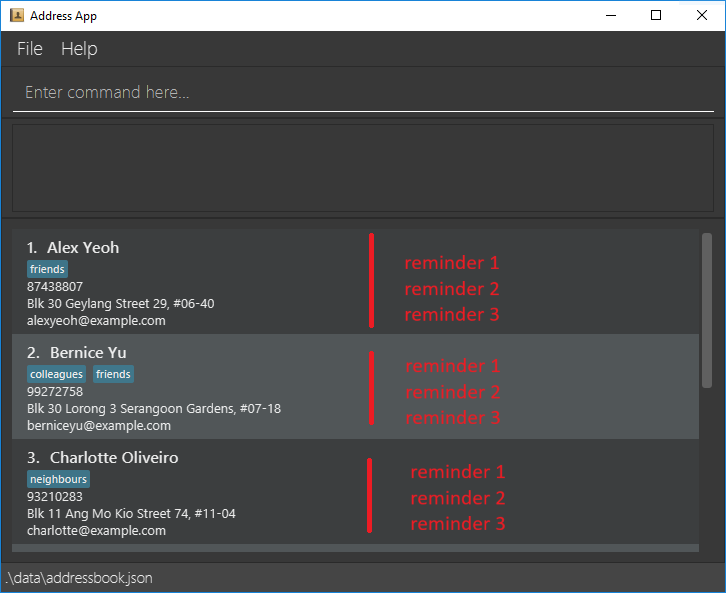
A window like the one below will appear after a few seconds. Note how the app contains some sample data.
Type the command in the command box and press Enter to execute it. e.g. typing
helpand pressing Enter will open the help window.
Some example commands you can try:list: Lists all contacts.add n/John Doe p/98765432 e/johnd@example.com a/John street, block 123, #01-01 ip/AIB Premium Plan: Adds a contact namedJohn Doeto FinHub.delete 3: Deletes the 3rd contact shown in the current list.clear: Deletes all contacts.exit: Exits the app.reminder 2 h/Meeting on Friday d/2026-04-24 16:00: Adds a reminder with headerMeeting on Fridayto client index 2.
Refer to the Features below for details of each command.
2. Features
General remarks about the command formats:
You need to supply the parameters which are in
UPPER_CASE.
e.g. inadd n/NAME,NAMEis a parameter which can be used asadd n/John Doe.Items in square brackets are optional.
e.gn/NAME [t/TAG]can be used asn/John Doe t/friendor asn/John Doe.Items with
… after them can be used multiple times including zero times.
e.g.[t/TAG]…can be used ast/friend,t/friend t/familyetc.Parameters can be in any order.
e.g. if the command specifiesn/NAME p/PHONE_NUMBER,p/PHONE_NUMBER n/NAMEis also acceptable.Extra parameters for commands that do not take in parameters (such as
help,list,exitandclear) will be ignored.
e.g. if the command specifieshelp 123, it will be interpreted ashelp.If you are using a PDF version of this document, be careful when copying and pasting commands that span multiple lines as space characters surrounding line-breaks may be omitted when copied over to the application.
Any indices i.e.
CLIENT_INDEX,REMINDER_INDEXandMEETING_NOTE_INDEXmust be positive integers 1, 2, 3, …NAMEshould only contain alphanumeric characters, spaces, periods, apostrophes, hyphens, parentheses," slashes, and commas, must not be blank, and must contain at least one letter.PHONE_NUMBERshould only contain numbers, and it should be at least 3 digits long.EMAILshould be of the format local-part@domain and adhere to the following constraints:- The local-part should only contain alphanumeric characters and these special characters, excluding the parentheses, (+_.-).
- The local-part may not start or end with any special characters.
- This is followed by a '@' and then a domain name.
- The domain name is made up of at least two domain labels separated by periods.
- The domain name must:
- end with a domain label at least 2 characters long.
- have each domain label start and end with alphanumeric characters.
- have each domain label consist of alphanumeric characters, separated only by hyphens, if any.
ADDRESScan take any values, and it should not be blank.INSURANCE_POLICYmay only contain letters, digits, spaces, and + / & ( ) ' . , - " and must include at least one letter or digit.TAGshould be alphanumeric.The
PHONE_NUMBERandEMAILof a client must be unique. Any duplicate entries during the add or edit client process will be rejected.
2.1 General Commands
2.1.1 Viewing help : help
Displays a message explaining how to access the help page.

Format: help
2.1.2 Listing all clients : list
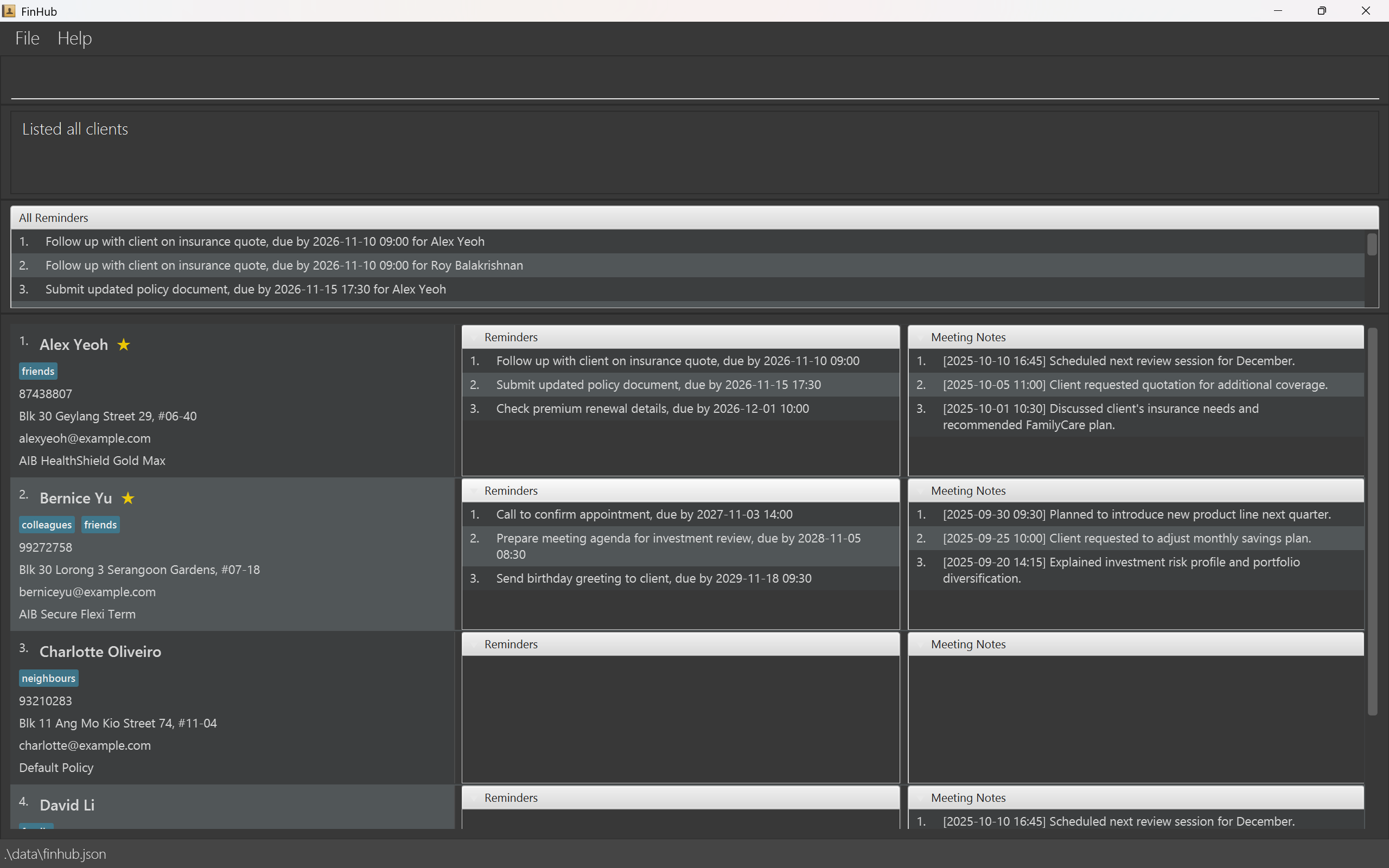
Displays a complete list of all clients in the FinHub system, including both active and archived clients.
Format: list
Below is an image showing what you should expect to see after running the list command with sample data.
2.1.3 Listing active clients : activelist
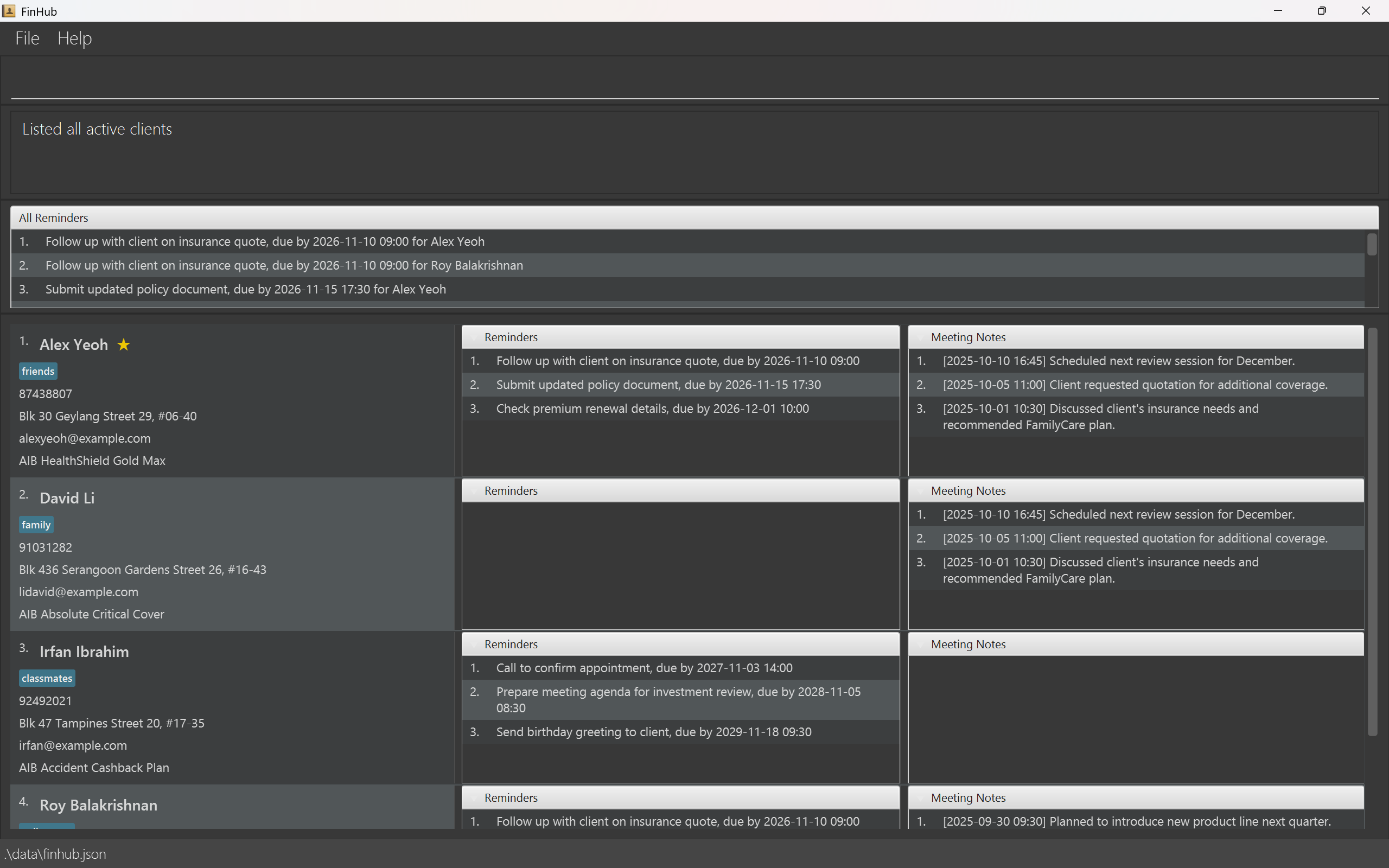
Displays only the active clients currently in the FinHub system.
Format: activelist
The image below displays the list of active clients after Bernice and Charlotte were archived from the sample data.
2.1.4 Listing archived clients : archivelist
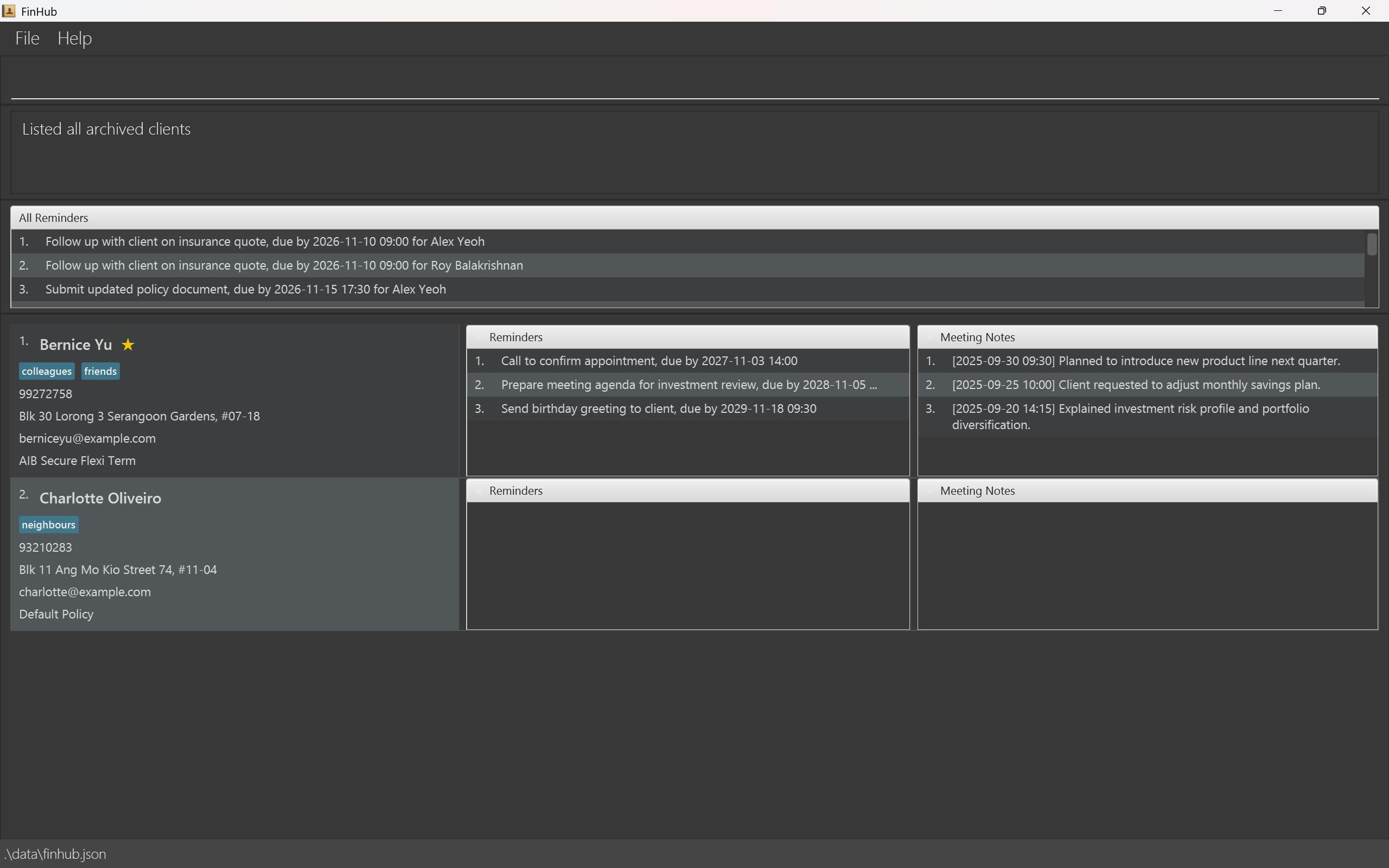
Displays all clients who have been archived in the FinHub system, meaning they are no longer active.
Format: archivelist
The clients shown in the image below are those you have archived. This example shows Bernice and Charlotte from the sample data.
2.1.5 Clearing all entries : clear
Clears all entries in FinHub, including client data, records, and any stored information.
Format: clear
Warning: This action will permanently erase all data in FinHub and cannot be undone. Make sure to back up any important information before proceeding.
Expected Output Message: FinHub has been cleared!
2.1.6 Exiting the program : exit
Exits FinHub.
Format: exit
2.2 Managing Clients
2.2.1 Adding a client : add
Adds a client to FinHub.
Format: add n/NAME p/PHONE_NUMBER e/EMAIL a/ADDRESS ip/INSURANCE_POLICY [t/TAG]…
Tip: A client can have any number of tags (including 0)
Examples:
add n/John Doe p/98765432 e/johnd@example.com a/John street, block 123, #01-01 ip/AIB Premium Plan
Assumptions:
- There isn't another client added with the same phone number or email as John Doe.
Expected Output Message: New client added: John Doe; Phone: 98765432; Email: johnd@example.com; Address: John street, block 123, #01-01; Insurance Policy: AIB Premium Plan; Tags:
add n/Betsy Crowe t/friend e/betsycrowe@example.com a/Palace street, block 456, #03-03 p/1234567 t/classmate ip/AIB LifePlan
2.2.2 Deleting a client : delete
Deletes a specified client from FinHub.
Format: delete CLIENT_INDEX
- Deletes the client at the specified
CLIENT_INDEX. CLIENT_INDEXrefers to the index number of the client shown in the currently displayed clients list.
Examples:
activelistfollowed bydelete 2deletes the 2nd client in the currently displayed clients list.
Assumptions:
- Alex Yeoh is the second client in the currently displayed clients list.
Expected Output Message: Deleted Client: Alex Yeoh; Phone: 87438807; Email: alexyeoh@example.com; Address: Blk 30 Geylang Street 29, #06-40; Insurance Policy: AIB HealthShield Gold Max; Tags: [friends]
find alexfollowed bydelete 1deletes the 1st client in the results of thefindcommand.
2.2.3 Editing a client : edit
Edits an existing client in FinHub.
Format: edit CLIENT_INDEX [n/NAME] [p/PHONE] [e/EMAIL] [a/ADDRESS] [t/TAG]… [ip/INSURANCE_POLICY]
- Edits the client at the specified
CLIENT_INDEX. CLIENT_INDEXrefers to the index number of the client shown in the displayed clients list.- At least one of the optional fields must be provided.
- Existing values will be updated to the input values.
- When editing tags, the existing tags of the client will be removed i.e adding of tags is not cumulative.
- You can remove all the client’s tags by typing
t/without specifying any tags after it.
Examples:
activelistfollowed byedit 1 p/91234567 ip/Health policychanges the 1st client’sPHONEto91234567andINSURANCE_POLICYtoHealth policyrespectively in the currently displayed client list.
Assumptions:
- The first client of the currently displayed list is Bernice Yu.
Expected Output Message: Edited Client: Bernice Yu; Phone: 91234567; Email: berniceyu@example.com; Address: Blk 30 Lorong 3 Serangoon Gardens, #07-18; Insurance Policy: Health policy; Tags: [colleagues][friends]
find alex yeohfollowed byedit 1 n/Alex Tan t/changes the name of the first client in the results of thefindcommand toAlex Tanand clears all his existing tags.
2.2.4 Locating clients by name : find
Finds clients whose names contain any of the given keywords.
Format: find KEYWORD [MORE_KEYWORDS]
- The search is case-insensitive.
- The order of the keywords does not matter.
- Only the name is searched.
- Clients matching at least one keyword will be returned (i.e.
ORsearch).
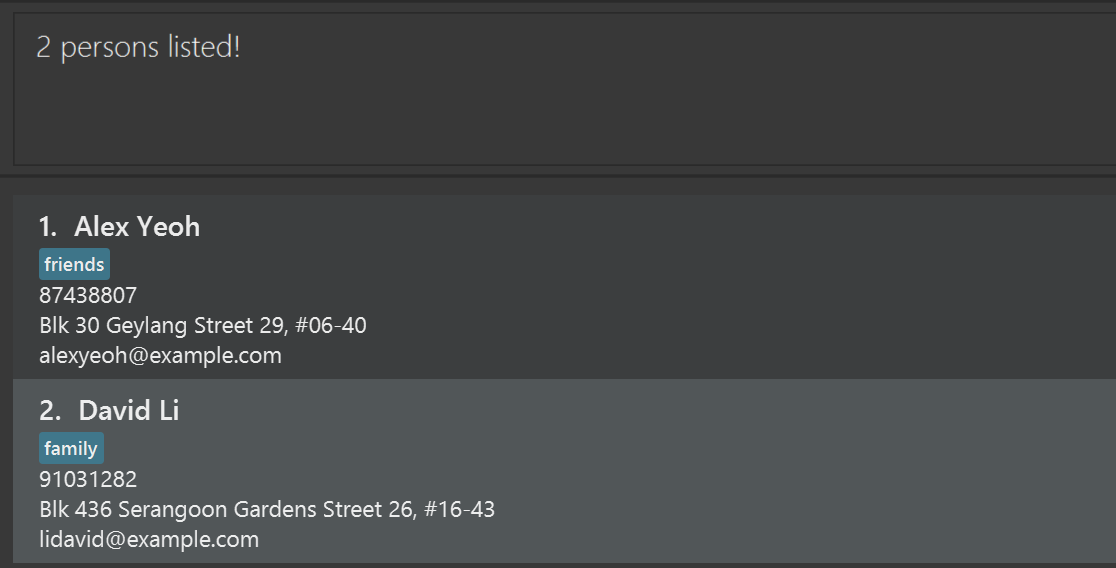
Examples:
find alereturnsAlex Yeoh.
Assumptions:
- There are 2 clients whose name contains "ale".
**Expected Output Message: 2 persons listed!
find Yu BerreturnsBernice Yu.find Alex DavidreturnsAlex Yeoh,David Li.
2.2.5 Starring a client : star
Stars the specified client in FinHub. Starred clients will have a star displayed next to their name, and will be bumped to the top of the displayed clients lists along with other starred clients.
Format: star CLIENT_INDEX
- Stars the client at the specified
CLIENT_INDEX. CLIENT_INDEXrefers to the index number of the client shown in the currently displayed clients list.- You can only star one client at a time.
Examples:
activelistfollowed bystar 1stars the 1st client in the currently displayed clients list.activelistfollowed bystar 2stars the 2nd client in the currently displayed clients list.find Alexfollowed bystar 1stars the 1st client in the results of thefindcommand.
Tip: You can use this feature to mark important clients as favourites!
2.2.6 Removing star status of a client : unstar
Removes the starred status of a specified client in FinHub.
Format: unstar CLIENT_INDEX
- Removes the starred status of the client at the specified
CLIENT_INDEX. CLIENT_INDEXrefers to the index number of the client shown in the currently displayed clients list.- You can only remove the star status from one client at a time.
Examples:
activelistfollowed byunstar 1removes star status from the 1st client in the currently displayed clients list.activelistfollowed byunstar 2removes star status from the 2nd client in the currently displayed clients list.find Alexfollowed byunstar 1removes star status from the 1st client in the results of thefindcommand.
Assumption:
- Alex Yeoh is the 1st client in the currently displayed clients list.
- Alex Yeoh is starred.
Expected Output Message: Starred status removed from Client: Alex Yeoh; Phone: 87438807; Email: alexyeoh@example.com; Address: Blk 30 Geylang Street 29, #06-40; Insurance Policy: AIB HealthShield Gold Max; Tags: [friends]
2.2.7 Archiving a client : archive
Archives the specified client in FinHub.
Format: archive CLIENT_INDEX
- Archives the client at the specified
CLIENT_INDEX. CLIENT_INDEXrefers to the index number of the client shown in the displayed clients list.- You can only archive one client at a time.
Examples:
activelistfollowed byarchive 1archives the 1st client in the displayed clients list.find Alexfollowed byarchive 1archives the 1st client in the results of thefindcommand if he is not archived.
Assumption:
- Alex Yeoh is the 1st client in the currently displayed clients list.
- Alex Yeoh is not archived.
Expected Output Message: Client archived: Alex Yeoh; Phone: 87438807; Email: alexyeoh@example.com; Address: Blk 30 Geylang Street 29, #06-40; Insurance Policy: AIB HealthShield Gold Max; Tags: [friends]
Tip: Temporarily archive inactive clients to de-clutter your active clients list!
Note:: Edits made to any archived client will automatically unarchive them.
2.2.8 Unarchiving a client : unarchive
Unarchives the specified client in FinHub.
Format: unarchive CLIENT_INDEX
- Unarchives the client at the specified
CLIENT_INDEX CLIENT_INDEXrefers to the index number of the client shown in the archived clients list.- You can only unarchive one client at a time.
Examples:
archivelistfollowed byunarchive 1unarchives the 1st client in the displayed clients listfind Alexfollowed byunarchive 1unarchives the 1st client in the results of thefindcommand if he is archived.
Assumption:
- Alex Yeoh is the 1st client in the currently displayed clients list.
- Alex Yeoh is archived.
Expected Output Message: Client unarchived: Alex Yeoh; Phone: 87438807; Email: alexyeoh@example.com; Address: Blk 30 Geylang Street 29, #06-40; Insurance Policy: AIB HealthShield Gold Max; Tags: [friends]
Note: You have to be in archivelist to unarchive clients.
2.3 Reminders
2.3.1 Adding a reminder : reminder
Adds a reminder to a specified client in FinHub.
Format: reminder CLIENT_INDEX h/HEADER d/DEADLINE
- Adds a reminder to the client at the specified
CLIENT_INDEX. - A reminder consists of a
HEADERwhich describes the task or event, and aDEADLINEwhich indicates when it's due. HEADERcannot be empty.DEADLINEshould be in the format:yyyy-MM-dd HH:mmCLIENT_INDEXrefers to the index number of the client shown in the currently displayed clients list.- Both
HEADERandDEADLINEmust be provided. - You can only add one reminder at a time.
- You can add more than one reminder to each client.
Examples:
activelistfollowed byreminder 2 h/Meeting on Friday d/2026-04-24 16:00adds the reminder "Meeting on Friday, due by 2026-04-24 16:00" to the 2nd client in the currently displayed clients list.
Assumption: Bernice Yu is the 2nd client in the currently displayed clients list.
Expected Output Message: Reminder added to Bernice Yu: Meeting on Friday, due by 2026-04-24 16:00
find alexfollowed byreminder 1 h/Meeting on Saturday d/2026-06-24 18:00adds the reminder "Meeting on Saturday, due by 2026-06-24 18:00" to the 1st client in the results of thefindcommand.
Tip: You can use reminders to stay on top of important client events, renewals, or follow-ups — never miss a key date again!
2.3.2 Deleting a reminder : rDelete
Deletes a reminder from a specified client in FinHub.
Format: rDelete CLIENT_INDEX REMINDER_INDEX
- Deletes the reminder at the specified
REMINDER_INDEXof the specified client atCLIENT_INDEX. CLIENT_INDEXrefers to the index number of the client shown in the currently displayed clients list.REMINDER_INDEXrefers to the index number of the reminder shown in the specified client's currently displayed reminders list.- Both
CLIENT_INDEXandREMINDER_INDEXmust be provided. - You can only delete one reminder at a time.
Examples:
activelistfollowed byrDelete 2 1deletes the 1st reminder in the currently displayed reminders list of the 2nd client in the currently displayed clients list.
Assumptions:
- Bernice Yu is the 2nd client in the currently displayed clients list.
- Meeting on Friday, due by 2026-04-24 16:00 is the first reminder in her list.
Expected Output Message: Deleted Client Bernice Yu's Reminder 1: Meeting on Friday, due by 2026-04-24 16:00
find alexfollowed byrDelete 1 1deletes the 1st reminder in the currently displayed reminders list of the 1st client in the results of thefindcommand.
Tip: Regularly delete overdue reminders to maintain a clean and organised workspace!
2.3.3 Editing a reminder : rEdit
Edits a specified reminder from a specified client in FinHub.
Format: rEdit CLIENT_INDEX REMINDER_INDEX h/HEADER d/DEADLINE
- Edits the reminder at the specified
REMINDER_INDEXof the specified client atCLIENT_INDEX. h/HEADERrefers to the header of the edited reminder.d/DEADLINErefers to the deadline of the edited reminder.CLIENT_INDEXrefers to the index number of the client shown in the currently displayed clients list.REMINDER_INDEXrefers to the index number of the reminder shown in the specified client's currently displayed reminders list.- Both
CLIENT_INDEXandREMINDER_INDEXmust be provided. - You can only replace one reminder with a new reminder at a time.
Examples:
activelistfollowed byrEdit 2 1 h/Meeting on Friday d/2026-04-24 16:00edits the 1st reminder in the currently displayed reminders list of the 2nd client in the currently displayed clients list to "Meeting on Friday, due by 2026-04-24 16:00".
Assumptions:
- Bernice Yu is the 2nd client in the currently displayed clients list.
- Call to confirm appointment, due by 2027-11-03 14:00 is the first reminder in her list.
Expected Output Message: Edited Client Bernice Yu's Reminder 1: from Call to confirm appointment, due by 2027-11-03 14:00 to Meeting on Friday, due by 2026-04-24 16:00
find alexfollowed byrEdit 1 1 h/Meeting on Friday d/2026-04-24 16:00edits the 1st reminder in the currently displayed reminders list of the 1st client in the results of thefindcommand to "Meeting on Friday, due by 2026-04-24 16:00".
2.4 Meeting Notes
2.4.1 Adding a meeting note : note
Adds a meeting note to a specified client in FinHub.
Format: note CLIENT_INDEX TEXT
- Adds a meeting note to the client at the specified
CLIENT_INDEX - When adding a meeting note, FinHub automatically records the date and time the note was added.
CLIENT_INDEXrefers to the index number of the client shown in the currently displayed clients list.TEXTrefers to the content of the meeting note that you want to add to the specified client.TEXTcannot be empty.- You can only add one meeting note at a time.
- You can add more than one meeting note to each client.
Examples:
activelistfollowed bynote 2 Client wants to renew policyadds the meeting note "Client wants to renew policy" to the 2nd client in the currently displayed clients list.
Assumptions:
- Bernice Yu is the 2nd client in the displayed clients list.
Expected Output Message: Meeting note added to Bernice Yu: [timestamp] Client wants to renew policy
find alexfollowed bynote 1 Client wants to know about policy 2adds the meeting note "Client wants to know more about policy 2" to the 1st client in the result of thefindcommand.
Tip: Regularly add meeting notes to keep track of discussions, decisions and follow-ups!
2.4.2 Deleting a meeting note : nDelete
Deletes a meeting note from a specified client in FinHub.
Format: nDelete CLIENT_INDEX MEETING_NOTE_INDEX
- Deletes the meeting note at the specified
MEETING_NOTE_INDEXof the specified clients listed atCLIENT_INDEX. CLIENT_INDEXrefers to the index number of the client shown in the currently displayed clients list.MEETING_NOTE_INDEXrefers to the index number of the meeting note shown in the specified client's displayed meeting notes list.- Both
CLIENT_INDEXandMEETING_NOTE_INDEXmust be provided. - You can only delete one meeting note at a time.
Examples:
activelistfollowed bynDelete 2 1deletes the 1st meeting note in the displayed meeting notes list of the 2nd client in the currently displayed clients list.
Assumptions:
- Bernice Yu is the 2nd client in the displayed clients list.
- [2025-09-30 09:30] Planned to introduce new product line next quarter is the first note in her list.
Expected Output Message: Deleted Client Bernice Yu's Meeting note 1: [2025-09-30 09:30] Planned to introduce new product line next quarter.
find alexfollowed bynDelete 1 1deletes the 1st meeting note in the displayed meeting notes list of the 1st client in the results of thefindcommand.
3. Data and Storage
3.1 Saving the data
FinHub data are saved in the hard disk automatically after any command that changes the data. There is no need to save manually.
3.2 Editing the data file
FinHub data are saved automatically as a JSON file [JAR file location]/data/finhub.json. Advanced users are
welcome to update data directly by editing that data file.
Warning:
If your changes to the data file makes its format invalid, FinHub will discard all data and start with an empty
data file at the next run. Hence, it is recommended to take a backup of the file before editing it.
Furthermore, certain edits can cause FinHub to behave in unexpected ways (e.g., if a value entered is outside
the acceptable range). Therefore, edit the data file only if you are confident that you can update it correctly.
3.3 Transferring Data to another Computer
Install the app in the other computer and overwrite the empty data file it creates with the file that contains the data of your previous FinHub home folder.
4. FAQ
Q: How do I transfer my data to another Computer?
A: Install the app in the other computer and overwrite the empty data file it creates by
copying the entire previous data/finhub.json file to the same location
Q: What happens if I make a mistake when entering client information?
A: No worries! You can use edit or rEdit to update the wrong field.
Q: Why are there already random people in my FinHub when I launch the application?
A: These pre-existing clients are sample data. You may simply use clear to remove them.
Q: I mistyped a client’s details. How do I update just one or two fields?
A: Use edit with only the fields you want to change, e.g.
edit 2 p/91234567 e/new@example.com.
Existing values not mention will be kept.
Q: How do I remove all tags from a client?
A: Type t/ with nothing after it in the edit command, e.g. edit 3 t/. This clears all tags.
Q: Can I search by more than just name?
A: Right now, find searches names only. It’s case-insensitive and matches full words.
Q: FinHub won’t load; did I break the data file?
A: If the data/finhub.json file is edited manually and becomes invalid, FinHub starts empty.
Restore a backup of that file or delete it to regenerate sample data. Try to avoid hand-editing it.
Q: Do commands accept parameters in any order?
A: Yes. For example, both of these are valid:
add n/Amy p/9123 e/amy@x.com a/Bishan ip/AIB Premium Plan
add p/9123 a/Bishan ip/AIB Premium Plan e/amy@x.com n/Amy
5. Known Issues
- When using multiple screens, if you move the application to a secondary screen, and later switch to using only
the primary screen, the GUI will open off-screen. To fix this, delete the
preferences.jsonfile created by the application, then restart the app. - If you minimise the Help Window, then run the
helpcommand (or use theHelpmenu, or the keyboard shortcutF1) again, the original Help Window will remain minimised, and no new Help Window will appear. To fix this, manually restore the minimised Help Window.
6. Command Summary
| Action | Format, Examples |
|---|---|
| Help | help |
| List | list |
| activelist | activelist |
| archivelist | archivelist |
| Clear | clear |
| Add | add n/NAME p/PHONE_NUMBER e/EMAIL a/ADDRESS ip/INSURANCE_POLICY [t/TAG]… e.g., add n/James Ho p/22224444 e/jamesho@example.com a/123, Clementi Rd, 1234665 t/friend t/colleague |
| Delete | delete CLIENT_INDEXe.g., delete 3 |
| Edit | edit CLIENT_INDEX [n/NAME] [p/PHONE_NUMBER] [e/EMAIL] [a/ADDRESS] [ip/INSURANCE_POLICY] [t/TAG]…e.g., edit 2 n/James Lee e/jameslee@example.com |
| Find | find KEYWORD [MORE_KEYWORDS]e.g., find James Jake |
| Star | star CLIENT_INDEXe.g., star 1 |
| Unstar | unstar CLIENT_INDEXe.g., unstar 1 |
| Archive | archive CLIENT_INDEXe.g., archive 1 |
| Unarchive | unarchive CLIENT_INDEXe.g., unarchive 1 |
| Reminder | reminder CLIENT_INDEX h/HEADER d/DEADLINEe.g., reminder 1 h/Meeting on Friday d/2026-04-24 16:00 |
| rDelete | rDelete CLIENT_INDEX REMINDER_INDEXe.g., rDelete 2 1 |
| rEdit | rEdit CLIENT_INDEX REMINDER_INDEX h/HEADER d/DEADLINEe.g., rEdit 1 1 h/Meeting on Friday d/2026-04-24 16:00 |
| Note | note CLIENT_INDEX TEXTe.g., note 1 Client wants to know about policy abc |
| nDelete | nDelete CLIENT_INDEX MEETING_NOTE_INDEXe.g., nDelete 1 1 |
7. Glossary
| Term / Command | Meaning |
|---|---|
Active List (activelist) | The list of all clients who are currently active (not archived). |
| Address | The residential or business location of a client, provided during add or edit commands. |
Archive (archive) | Command to move a client into the archived clients list, removing them from the active list. Useful for decluttering inactive clients. |
Archived List (archivelist) | The list of clients who have been archived. |
Clear (clear) | Command that deletes all clients and related data from FinHub. |
| Client Index | The number representing a client’s position in the currently displayed list. Must be a positive integer (1, 2, 3…). |
Delete (delete) | Command to remove a client from FinHub permanently. |
Edit (edit) | Command to update client details such as name, phone, email, address, tags, or insurance policies. |
| The email address stored for a client. | |
Find (find) | Command to search for clients by name using case-insensitive keywords. |
| GUI (Graphical User Interface) | The visual component of FinHub that displays clients lists, reminders, and other information alongside the CLI. |
Help (help) | Command to show the help window with guidance on how to use FinHub. |
| Home Folder | The folder where the .jar file and saved data files for FinHub are stored. |
Insurance Policy (ip/INSURANCE_POLICY) | A client field to record insurance policies they hold. |
Jar File (.jar) | The Java Archive file that runs the FinHub application. |
List (list) | Command to show all clients (both active and archived). |
Meeting Note (note) | A short record of discussions with a client, stored along with the date and time it was added. |
nDelete (nDelete) | Command to delete a specific meeting note from a client. |
| Phone Number | The client’s contact number, added or updated with the add or edit commands. |
Reminder (reminder) | A task or deadline linked to a client with a header and a due date. |
rDelete (rDelete) | Command to delete a specific reminder from a client. |
rEdit (rEdit) | Command to edit or update a specific reminder for a client. |
Star (star) | Command to mark a client as important. Starred clients are shown at the top of lists. |
Unarchive (unarchive) | Command to restore an archived client back into the active list. |
Unstar (unstar) | Command to remove the starred status from a client. |
Tags (t/TAG) | Labels added to clients for easier categorization (e.g., friend, colleague). |
| JSON File | The file format used by FinHub to store client data on disk (addressbook.json). |
| CLI (Command Line Interface) | The text-based interface where you type commands to control FinHub. |